


- ADA website compliance is no longer optional. WCAG 2.1 AA is becoming the de facto standard, with clear deadlines and growing enforcement across industries
- Accessibility directly impacts business performance. It affects SEO, AI discoverability, conversion rates, revenue, and enterprise deal eligibility
- Compliance requires a system-level approach. It must be built into design, engineering, and continuous testing to reduce risk and scale effectively
Is your digital product quietly limiting growth without you realizing it? With the increase in regulatory scrutiny and user expectations, ADA website compliance has become a defining factor in how organizations scale, compete, and win trust online. What was once treated as a legal safeguard is now directly tied to product performance, discoverability, and revenue outcomes.
Yet despite rising awareness, most companies are still behind: a 2026 report on the accessibility of the top 1,000,000 web pages found that they average 56.1 errors per page, a 10% increase from 2025.
With enforceable deadlines approaching and WCAG standards shaping digital requirements, the cost of inaction is rising fast.
This article breaks down what ADA compliance for websites really means, where it applies, and how it unlocks measurable gains in reach, conversion, and long-term business growth.
What does ADA compliance for websites actually mean?

ADA compliance requirements for websites mean that products of web development: websites, web apps, and mobile experiences — must be accessible to people with disabilities. In practical terms, this means ensuring that all users, regardless of physical or cognitive ability, can perceive, navigate, and interact with your digital environment without barriers.
The foundations: ADA Title II and Title III
At its core, ADA compliance is governed by two key sections of the law that define where and how accessibility requirements apply.
- Title II applies to state and local government entities, requiring all public-facing digital services (corporate websites, portals, applications) to be accessible.
- Title III applies to private-sector businesses considered “public accommodations,” including companies offering services online.
Historically, the ADA compliance rules focused on physical spaces: ramps, elevators, and signage. Today, enforcement has expanded to include websites, mobile apps, and digital platforms, reflecting the shift of essential services online.
Current benchmark for ADA website compliance: WCAG 2.1 Level AA
Current ADA guidelines do not prescribe specific technical standards for digital accessibility. Instead, enforcement consistently aligns with the Web Content Accessibility Guidelines (WCAG) 2.1 Level AA, which serve as the accepted benchmark for compliance.
This standard governs the core elements of accessible web design and development:
- Keyboard navigation. All functionality on a website must be operable using a keyboard alone, without requiring a mouse. This is critical for users with motor impairments who rely on assistive input devices. Proper implementation includes logical tab order, visible focus states, and accessible interactive elements.
- Screen reader compatibility. Websites must be structured so screen readers (e.g., NVDA, VoiceOver) can accurately interpret and convey content. This requires semantic HTML, proper element labeling, and meaningful descriptions for interactive components. Without this, visually impaired users cannot effectively navigate or understand the interface.
- Color contrast ratios. Text and UI elements must meet minimum contrast thresholds to remain readable for users with low vision or color blindness. WCAG compliance defines specific contrast ratios (e.g., 4.5:1 for standard text) to ensure clarity. Poor contrast is one of the most common accessibility failures in modern UI design.
- Captions and transcripts. All audio and video content must include captions (for spoken dialogue) and transcripts (for full context). This ensures accessibility for users who are deaf or hard of hearing, as well as those consuming content in sound-restricted environments. It also improves content indexing and reuse across platforms.
- Error handling and form accessibility. Forms must provide clear instructions, accessible labels, and descriptive error messages that are detectable by assistive technologies. Users should be able to understand what went wrong and how to fix it without ambiguity. This is especially critical in high-conversion flows like sign-ups, checkouts, and applications.
- Logical structure and semantic HTML. Content must follow a clear, hierarchical structure using proper HTML semantics (headings, lists, landmarks). This allows assistive technologies to interpret relationships between elements and enables efficient navigation. A well-structured DOM also improves SEO and AI parsing capabilities.
How do ADA web compliance requirements apply to websites in the public and private sectors?

ADA compliance requirements for websites apply broadly across both public and private sectors. The key distinction lies in how explicitly requirements are defined and enforced, and how courts interpret digital experiences as part of service delivery.
Public sector
The public sector is explicitly regulated under ADA Title II, which mandates full accessibility across all digital services provided by state and local governments.
- Government websites. These include official portals used for public communication, service delivery, and information access. All content must be accessible, as these sites serve as primary touchpoints for civic engagement.
- Public education institutions (from kindergartens to universities). ADA compliance governs school, college, and university websites. All of them must ensure that learning platforms, course materials, and administrative systems are accessible. This includes LMS platforms, enrollment systems, and digital classrooms.
- Public healthcare institutions. Government-funded hospitals and clinics must provide accessible patient portals, appointment systems, and medical information. Accessibility here is critical, as barriers can directly impact patient outcomes.
- Government digital services handling forms, payments, taxes, and applications. Any system used to submit personal data, pay fees, or access public services must be fully accessible. This includes tax portals, licensing systems, and benefit applications, where usability is legally and functionally essential.
Private sector
In the private sector, accessibility website compliance is governed by Title III, but enforcement is shaped largely by court interpretations and compliance audits.
The core principle:
Websites are treated as an extension of the business itself.
If a physical business must be accessible, its digital counterpart is expected to meet the same standard. This is especially relevant for industries such as:
- Fintech and banking. Platforms handling financial transactions must ensure that dashboards, payment flows, and account management are accessible. Inaccessibility here can directly block users from managing their finances.
- Healthcare & telemedicine. Digital healthcare services, including appointment booking, virtual consultations, and patient portals, must meet ADA compliance website requirements, as they provide essential services tied to health and safety.
- E-learning platforms. Online education providers must ensure that course delivery, assessments, and learning materials are accessible. This is especially critical for institutions serving U.S.-based learners.
- E-commerce. Online stores must provide accessible browsing, product discovery, and checkout experiences. Barriers in these flows can result in both lost revenue and legal exposure.
- SaaS products with public interfaces (CRM, project management, HR platforms, etc.). Even B2B and B2C tools, such as progressive web apps, are subject to ADA WCAG compliance if they include public-facing components such as login pages, onboarding flows, or shared environments. Accessibility must extend across dashboards, workflows, and
Below, you’ll find a comparison of key similarities and differences between ADA compliant website design for public and private entities
|
Aspect |
Public sector (Title II) |
Private sector (Title III) |
| Legal clarity | Explicit regulatory requirements (DOJ rule, WCAG 2.1 AA) | Defined through case law and enforcement trends |
| Scope | All digital services and content | Websites and apps tied to business operations |
| Enforcement | Proactive compliance required | Often reactive (lawsuits, audits), but shifting toward proactive |
| Risk level | Regulatory penalties and federal oversight | Litigation risk, settlements, and reputational damage |
| Compliance approach | System-wide accessibility mandated | Increasing adoption of WCAG as a standard |
Exceptions to ADA compliant website design
While website accessibility standards are broadly applicable, there are limited exceptions to ADA compliance that organizations should be aware of. However, these exceptions are often narrower than businesses assume.
- Small private clubs and religious organizations. These entities may be exempt under Title III, particularly if they are not considered public accommodations. However, this exemption does not always extend to all digital services, especially if they operate commercially.
- Businesses without a clear connection to public access. Purely internal systems (e.g., employee-only tools) are generally outside the scope of the ADA. That said, once any part of the system becomes customer-facing, accessibility expectations apply.
- Legacy content (in limited cases). Some older digital content may not require immediate remediation under certain conditions. However, any updated or actively used content must meet accessibility standards.
- Third-party platforms (partial responsibility). While vendors may share responsibility, businesses are still accountable for ensuring that integrated tools do not create accessibility barriers.
Bottom line: If your business serves users in the U.S. and provides essential or widely used digital services, ADA compliance applies—regardless of where your company is headquartered.
The turning point for WCAG compliance: April 2024 DOJ rule, and what does it mean for public entities
The April 2024 rule introduced by the U.S. Department of Justice (DOJ) marks a decisive shift in how ADA compliance rules are enforced in digital environments. Prior to this, accessibility requirements for websites were largely shaped by case law, audits, and the adoption of WCAG best practices, with no single binding federal standard for web compliance.
The new rule changes that.
It establishes a clear, enforceable requirement that public entities must ensure their digital content meets WCAG 2.1 Level AA. This removes ambiguity and sets a uniform baseline for accessibility across government services.
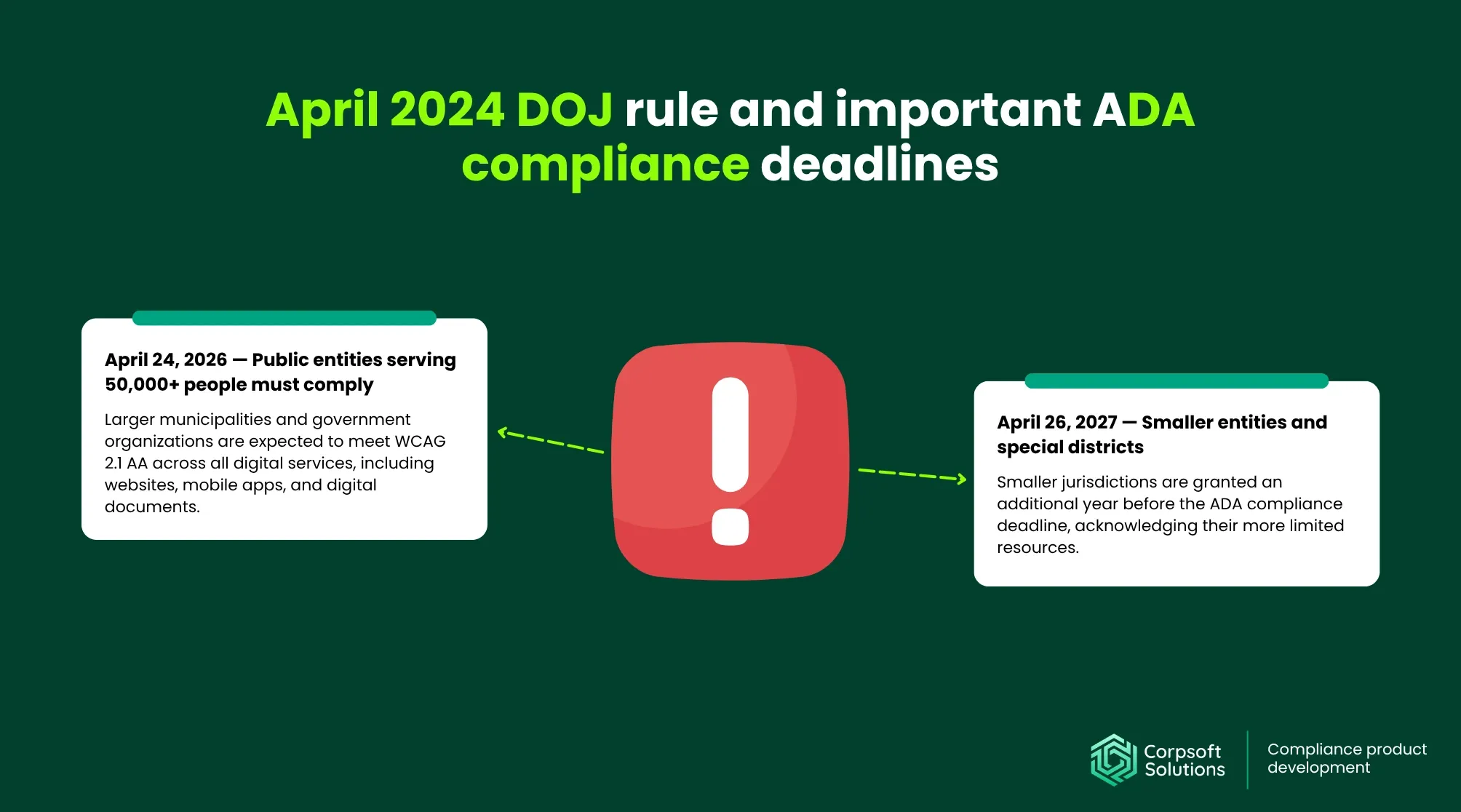
The rule primarily targets state and local government entities, but its implications extend far beyond the public sector, particularly by setting a precedent for interpreting WCAG compliance. DoJ establishes 2 major compliance deadlines:
- April 24, 2026 — Public entities serving 50,000+ people must comply. Larger municipalities and government organizations are expected to meet WCAG 2.1 AA across all digital services, including websites, mobile apps, and digital documents. This timeline reflects the scale and complexity of their systems, requiring WCAG compliance audits, structured remediation, and long-term accessibility programs.
- April 26, 2027 — Smaller entities and special districts. Smaller jurisdictions are granted an additional year before the ADA compliance deadline, acknowledging their more limited resources. However, the expectation remains the same: full compliance across all public-facing digital services, not partial or phased accessibility.
What about private entities?
While these deadlines are formally defined for the public sector, private businesses should not interpret this as reduced exposure. In practice, the DOJ rule is accelerating the de facto standardization of WCAG 2.1 AA across all industries.
- Courts increasingly reference WCAG 2.1 AA. Even before the 2024 rule, the Department of Justice consistently interpreted the ADA as applying to digital experiences. Official guidance states that businesses open to the public must ensure their online services are accessible, as inaccessible websites can prevent equal access to goods and services.
- Plaintiffs rely on DOJ standards in litigation. The DOJ rule strengthens plaintiffs’ position by providing a clear, government-backed standard. This makes it easier to argue non-compliance and increases the likelihood that courts will align with WCAG-based expectations.
- Enterprises adopt WCAG proactively to mitigate risk. Large organizations are integrating WCAG compliance testing into their products and compliance strategies.
The technical backbone of ADA website compliance: WCAG 2.1 AA and its core principles

At the implementation level, ADA website compliance is achieved by adhering to WCAG 2.1 Level AA, the globally recognized standard for accessible digital experiences. While the ADA defines what must be achieved (equal access), WCAG defines how to achieve it in practice.
Core pillars of WCAG compliance for websites: POUR framework explained
WCAG is structured around four foundational principles, also known as the POUR framework.
- Perceivable – Content must be visible/hearable. Users must be able to perceive information regardless of sensory limitations.
- Operable – Interfaces must be operable via keyboard and assistive technologies. All interactive elements must be usable without a mouse.
- Understandable – Content must be clear and predictable. Interfaces should behave consistently and provide clear instructions.
- Robust – Compatible with evolving technologies. Content must be built using standards that work across browsers, devices, and assistive technologies.
Common failure points for WCAG compliance adoption (and Corpsoft Solutions tips to avoid them)
Even teams aware of WCAG often fail to implement it due to gaps in processes, tooling, or architecture. Below, you’ll find the list of the website areas most susceptible to compliance issues, along with our tips on how to avoid them:
| Issue | Corpsoft Solutions tip |
| Inaccessible forms and checkout flows
Missing labels, unclear errors, or non-linear navigation break critical user journeys. |
Use explicit <label> associations, accessible error messaging, and test flows with screen readers and keyboard-only navigation |
| Dynamic UI without Accessible Rich Internet Applications (ARIA) attributes support
Modern single-page apps often rely on JavaScript-driven components that are invisible to assistive technologies. |
Apply ARIA roles carefully, manage focus states, and ensure dynamic updates are announced to screen readers. |
| Poor semantic structure
Misused headings and non-semantic elements (e.g., <div> instead of <button>) disrupt navigation and interpretation. |
Use semantic HTML by default and enforce structure through code reviews and design systems. |
| Missing captions/transcripts
Multimedia content without alternatives excludes users with hearing impairments. |
Provide synchronized captions and full transcripts for all audio/video assets. |
| Third-party widget conflicts
Embedded tools (chatbots, payment widgets) often introduce inaccessible components. |
Perform WCAG compliance audits for third-party vendors and include accessibility requirements in procurement contracts. |
Intersectional strategy for American with Disabilities Act website compliance

For most enterprise-grade websites, an ADA compliance checklist rarely exists in isolation. Instead, it intersects with multiple regulatory frameworks that govern data protection, security, and user rights. Treating accessibility as a standalone initiative often leads to duplicated effort, fragmented processes, and increased compliance risk.
A more effective approach is to view ADA as a horizontal layer that spans across all systems, workflows, and regulatory requirements.
- Section 508 — Federal digital accessibility requirements. Section 508 applies to U.S. federal agencies and organizations working with them, requiring digital content to be accessible (aligned with WCAG standards). It closely overlaps with ADA website compliance in terms of technical implementation, meaning that achieving WCAG 2.1 AA compliance often satisfies both frameworks.
- HIPAA — Healthcare data protection and usability. HIPAA compliance governs the security and privacy of patient data, but it also implicitly requires that healthcare interfaces (patient portals, telemedicine platforms) are usable and understandable. ADA complements this by ensuring that these systems are accessible to users with disabilities, thereby making the two compliance areas tightly coupled in healthcare products.
- PCI DSS — Payment security standards. PCI DSS compliance focuses on securing payment data and transaction flows. However, ADA intersects at the UX level: payment forms, checkout processes, and authentication steps must be accessible. A secure but inaccessible payment flow can still create legal and revenue risk.
- CCPA — Consumer privacy rights (California). CCPA requires businesses to provide clear disclosures and controls over the use of personal data. ADA ensures that these privacy notices, opt-outs, and controls are accessible and understandable to all users, including those using assistive technologies.
- GDPR / data protection – Consent and transparency. GDPR compliance mandates transparent consent flows and clear communication about data usage. ADA reinforces this by requiring that consent banners, cookie settings, and privacy policies be navigable, readable, and operable for users with disabilities.
When ADA compliance is treated as a horizontal layer across all regulatory domains, it allows organizations to reduce duplication in design and compliance efforts, shorten time-to-compliance across multiple standards, minimize legal overhead, and decrease overall exposure to regulatory and litigation risk.
Read more: Corpsoft Solutions’ GDPR website checklist
Ways in which ADA-compliant websites help businesses with outreach
ADA website compliance is often framed as a legal requirement, but its impact on audience reach and market expansion is equally significant.
Globally, over 1.3 billion people live with some form of disability. In the U.S. alone, more than 1 in 4 adults (28.7%) reported having a disability in 2025. This creates a massive, often underserved user segment that directly impacts traffic, conversions, and revenue potential. And here’s how maintaining website ADA compliance helps you to interact with this segment.
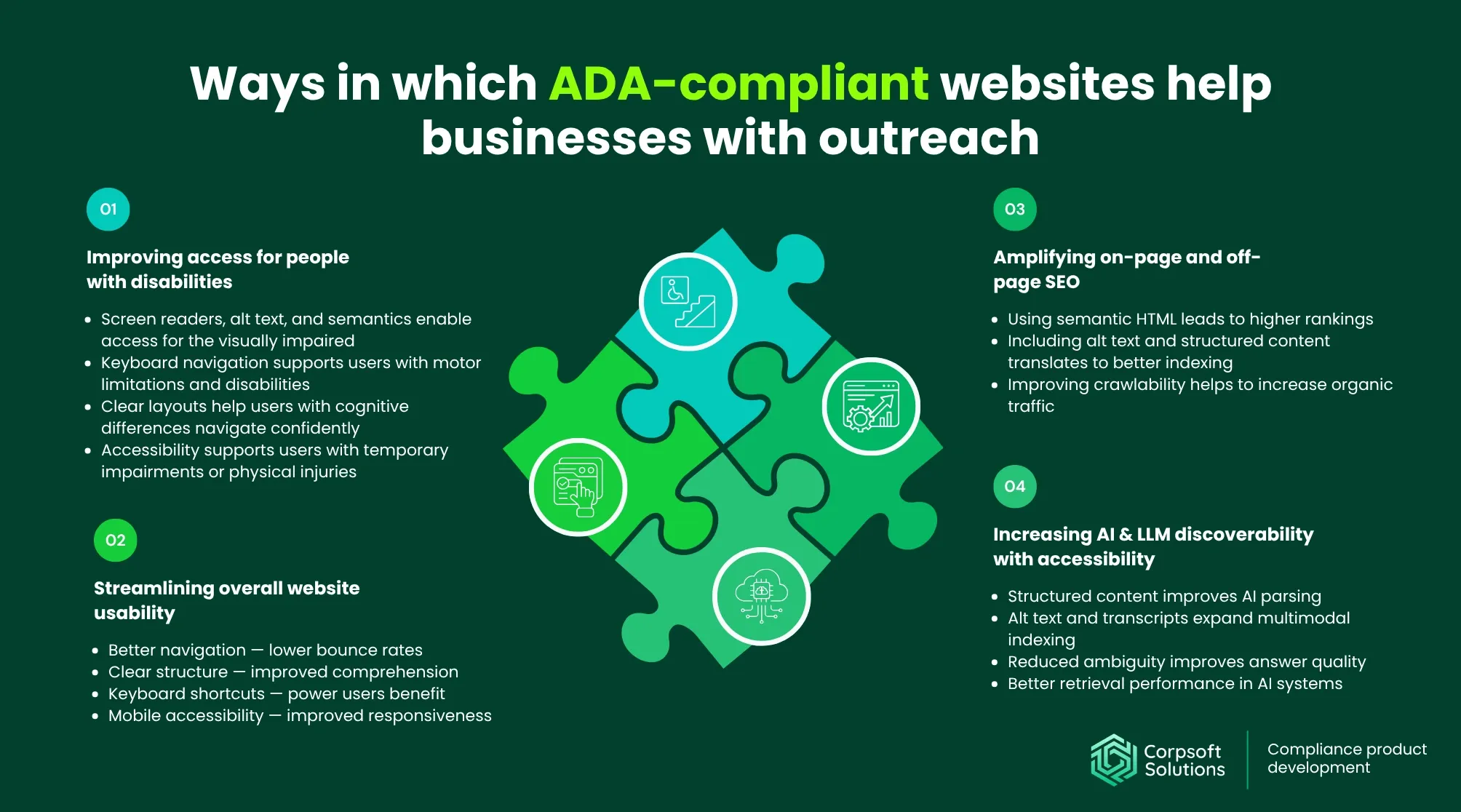
#1 Improving access to people with disabilities
An ADA-compliant website removes barriers that prevent millions of users from interacting with your business. Here’s how:
- Users with visual impairments will benefit from features such as screen-reader compatibility, alt text for images, and proper semantic structure. They allow navigation and understand content without relying on sight. Without these, entire sections of your website may be effectively invisible.
- Users with motor limitations will be able to navigate your website with features such as keyboard navigation, larger clickable areas, and reduced reliance on precise interactions. This is critical for forms, navigation menus, and transactional flows.
- Users with cognitive differences will appreciate сlear layouts, predictable navigation, and simplified language. Structured content and consistent UI patterns reduce confusion and cognitive load.
- Users with temporary impairments, such as injuries, may also benefit from accessibility features, as may older users with declining sensory abilities. These users often represent a growing and high-value demographic.
#2 Streamlining overall website usability
Even though accessibility improvements are a top priority for users with disabilities, they can generally enhance the experience for all users who visit your website.
- Better navigation — lower bounce rates. Clear navigation structures and logical page hierarchies make it easier for users to quickly find what they need. This reduces frustration and decreases the likelihood of early exits.
- Clear structure — improved comprehension. Proper use of headings, spacing, and content grouping improves readability and information flow. Users can scan and understand content faster, which increases engagement.
- Keyboard shortcuts — power users benefit. Keyboard accessibility, along with offering support for users with disabilities, also enables faster navigation for experienced users. This improves efficiency in data-heavy or workflow-driven platforms.
- Mobile accessibility — improved responsiveness. Many accessibility practices (larger touch targets, readable text, simplified layouts) translate directly into better mobile UX. This leads to improved performance across devices and user contexts.
#3 Amplifying on-page and off-page SEO
Accessibility and SEO are structurally aligned: both rely on clarity, structure, and machine-readable content.
- Using semantic HTML leads to higher rankings. Proper use of headings, landmarks, and structured elements helps search engines better understand page content. This improves relevance signals and ranking potential.
- Including alt text and structured content translates to better indexing. Descriptive alt text and well-organized content make pages more interpretable for search crawlers. This increases the likelihood of appearing in relevant search queries.
- Improving crawlability helps to increase organic traffic. Clean, accessible code reduces parsing errors and improves how search engines navigate your site. As a result, more pages are indexed correctly, driving higher organic visibility.
Beyond compliance, accessibility becomes a technical SEO advantage that compounds over time.
#4 Increasing AI & LLM discoverability with accessibility
As search evolves toward AI-driven interfaces and generative engines, accessibility plays an increasingly important role in how content is discovered and surfaced.
Accessibility directly supports GEO (Generative Engine Optimization) and LLM visibility by making content easier to parse, structure, and reuse.
- Structured content improves AI parsing. Clear heading hierarchies and semantic HTML allow AI systems to segment and interpret content accurately. This increases the likelihood that your content will be selected for AI-generated answers.
- Alt text and transcripts expand multimodal indexing. Accessibility requirements convert visual and audio content into text formats that AI models can process. This increases your content’s presence in both text and multimodal search environments.
- Reduced ambiguity improves answer quality. Accessible websites provide clear relationships between elements, reducing misinterpretation. This improves the accuracy with which AI systems represent your content and brand.
- Better retrieval performance in AI systems. Clean, well-structured content improves embedding quality and relevance matching in retrieval-based AI systems. This increases the likelihood that your content will be included in AI responses.
AI helps businesses to achieve compliance in many ways. Learn how agentic AI can boost your business processes and minimize human errors.
Website accessibility as a revenue and positive brand image driver
For most organizations, revenue leakage accumulates across friction in user journeys, missed market segments, and disqualified opportunities. Accessibility directly addresses all three.
Leading teams treat ADA compliance for websites as a conversion infrastructure upgrade, one that improves how users complete actions, how platforms qualify for enterprise deals, and how products scale across regulated markets. Below is how accessibility requirements translate into measurable business impact:
| Optimization parameter | Accessibility requirement | Potential impact on revenue | Who benefits most |
| Conversion rate | Accessible forms, clear error handling, keyboard navigation | Higher form completion rates, fewer drop-offs in checkout/onboarding | E-commerce, SaaS, fintech |
| Session duration | Clear content structure, readable UI, logical navigation | Increased engagement and content consumption | Media platforms, EdTech, SaaS |
| Bounce rate | Intuitive navigation, fast access to key content, and screen reader compatibility | Lower early exits, improved first interaction success | Marketing websites, SaaS landing pages |
| Customer retention | Consistent UX, predictable interactions, accessible dashboards | Improved user satisfaction and repeat usage | SaaS platforms, CRM tools, HR software |
| Market reach | Screen reader support, captions, adaptable UI | Access to underserved user segments and broader audience | All industries, especially public-facing platforms |
Beyond UX improvements, accessibility plays a decisive role in revenue qualification and deal flow.
- Government contracts and public sector procurement. Accessibility is often a non-negotiable requirement in public tenders. Vendors must demonstrate compliance to even be considered, meaning accessibility directly determines eligibility for government-funded projects.
- Enterprise procurement and RFP requirements. Large enterprises embed accessibility into vendor evaluation criteria, particularly in regulated sectors. If your product cannot meet these standards, it may be excluded before technical or commercial discussions even begin.
- Partnerships, integrations, and platform eligibility. Accessibility gaps introduce compliance risk for partners. As a result, non-compliant products are often deprioritized or rejected in integrations, limiting ecosystem growth and downstream revenue opportunities.
Managing brand perception and legal risks
ADA WCAG compliance and accessibility is one of the few areas where product quality, brand perception, and legal exposure intersect directly. From a market perspective, accessible websites signal something deeper than compliance. They indicate that a company has mature design and engineering processes, structured quality assurance practices, and a clear understanding of diverse user needs
For users, this translates into trust and reliability. Interfaces that are easy to navigate, predictable, and inclusive reduce friction and create a sense of control, especially in high-stakes environments like finance, healthcare, or education.
For enterprise buyers and investors, accessibility acts as a proxy for operational maturity. A product that meets WCAG compliance standards is more likely to be:
- Scalable across markets
- Compatible with regulated environments
- Lower risk in long-term adoption
This directly influences things like vendor selection decisions, partnership opportunities, and perceived product quality during due diligence
Best practices to achieve ADA compliance for websites: Corpsoft Solutions recommendations

Achieving ADA website compliance requires a structured, cross-functional approach embedded into how products are designed, built, and scaled. Based on industry benchmarks and our delivery experience, the following practices outline how to achieve accessibility effectively.
#1 Adopt “Compliance-as-a-system” approach
Accessibility fails when treated as a one-off initiative. Without system-level integration, teams introduce regressions, duplicate effort, and increase remediation costs.
Corpsoft Solutions recommendations:
- Define accessibility requirements during discovery, scoping, and product planning to avoid costly retrofits later
- Translate WCAG criteria into clear, actionable requirements within user stories and acceptance criteria
- Assign ownership across design, engineering, and QA teams to ensure accountability at every stage
- Introduce accessibility checkpoints into delivery workflows and release approvals to prevent regressions
#2 Implement accessibility-first design systems
Design systems are the most efficient way to scale accessibility across multiple products and teams. Solving accessibility at the component level prevents recurring issues.
Corpsoft Solutions recommendations:
- Build and maintain a library of pre-validated WCAG checklist of UI components for consistent reuse
- Establish clear standards for color contrast, typography, and visual hierarchy across all interfaces
- Design interaction patterns that support keyboard navigation, visible focus states, and accessible error handling
- Document and enforce design system usage to ensure consistency across teams and products
#3 Integrate WCAG into engineering workflows
Accessibility must be treated as a development standard, as engineering decisions directly determine compliance outcomes.
Corpsoft Solutions recommendations:
- Use semantic HTML structures as a default to ensure compatibility with assistive technologies
- Apply ARIA attributes selectively to enhance native accessibility
- Ensure all interactive elements are fully operable via keyboard navigation
- Build dynamic components (modals, dropdowns, SPA interactions) with accessibility in mind from the start
- Include accessibility validation as part of code reviews and pull request criteria
#4 Govern third-party and vendor accessibility
Even fully ADA-compliant websites can break due to external integrations. Third-party components are a common source of accessibility violations.
Corpsoft Solutions recommendations:
- Evaluate third-party tools (payment systems, chat widgets, plugins) for accessibility before integration
- Include explicit accessibility requirements in vendor contracts and SLAs
- Continuously monitor vendor updates to identify and address compliance regressions
- Maintain contingency plans for replacing or mitigating non-compliant third-party solutions
#5 Establish continuous accessibility testing
Point-in-time audits are insufficient for modern products. Accessibility must be validated continuously as the system evolves.
Corpsoft Solutions recommendations:
- Integrate automated accessibility checks into your CI/CD pipelines for ongoing validation
- Conduct manual testing using screen readers and assistive technologies
- Validate all key user flows through keyboard-only navigation testing
- Implement regression testing processes to catch accessibility issues before release
#6 Build accessibility expertise into teams
Tools alone cannot ensure compliance. Business teams must understand how to implement accessibility correctly.
Corpsoft Solutions recommendations:
- Train design teams to incorporate WCAG principles into everyday design decisions
- Equip engineers with practical knowledge of accessible coding standards and patterns
- Enable QA teams to test using assistive technologies and real-world scenarios
- Establish internal accessibility champions to drive adoption and maintain standards
#7 Document and prepare for WCAG compliance audits
In regulated environments, documentation is as important as implementation. Without it, proving compliance becomes difficult.
Corpsoft Solutions recommendations:
- Maintain up-to-date accessibility conformance reports (ACRs / VPATs)
- Document remediation efforts, decisions, and audit outcomes for transparency
- Develop internal accessibility guidelines to standardize implementation
- Prepare documentation aligned with enterprise procurement and RFP requirements
#8 Align accessibility with business KPIs
Accessibility delivers measurable business outcomes when tied to performance metrics, not treated as a standalone initiative.
Corpsoft Solutions recommendations:
- Track improvements in conversion rates across accessible user flows
- Measure impact on customer retention and user satisfaction
- Leverage accessibility to enter regulated markets and public sector opportunities
- Align accessibility efforts with SEO performance and organic growth strategies
When accessibility is aligned with business KPIs, it shifts from a compliance cost to a strategic growth driver, enabling both regulatory readiness and measurable performance gains.
Conclusion
ADA website compliance has moved from a peripheral concern to an intersection of regulation, product quality, and business performance. As WCAG 2.1 AA becomes the de facto standard and enforcement tightens, organizations that delay action risk losing access to users, contracts, and growth opportunities.
At the same time, the upside is clear. Accessibility expands market reach, improves usability for all users, strengthens SEO and AI discoverability, and unlocks enterprise and public-sector revenue streams. When approached strategically, it becomes a scalable advantage.
The key shift for leadership teams is to treat accessibility as a capability embedded into design, engineering, and delivery workflows, rather than a reactive fix.
Organizations that make this transition early will not only meet compliance requirements but also build more resilient, inclusive, and high-performing digital products.
Share this post: