



Most websites fail to comply with GDPR regulation not because companies intentionally ignore privacy laws. They become non-compliant because the data collection process on modern websites is complex, decentralized, and constantly evolving. Marketing scripts change weekly, analytics tools update automatically, and development teams rarely have full visibility into what data is being processed in the background.
That’s exactly why regulators focus heavily on websites: they are the most visible and measurable entry point for personal data processing. A single compliance gap, like cookies firing before consent, can expose an organization to investigations, fines, and reputational damage.
Our guide will walk you through website GDPR compliance from a practical standpoint: what regulators actually look for, how to audit your website step by step, how to fix issues efficiently, and how to build a sustainable compliance process.
Why website GDPR compliance is still a major risk area
Website compliance remains one of the most common enforcement triggers under GDPR. Authorities consistently identify web tracking and consent failures as top violations because they affect large numbers of individuals simultaneously.
There are several reasons websites present an elevated risk.
#1 Most companies think of compliance as simply a cookie banner
Сompanies used to treat cookies as a simple disclosure issue: show a banner, mention them in a policy, and continue tracking. That changed when regulators clarified that most cookies involve processing personal data and require prior consent.
Modern cookie walls underwent a few major changes:
- Tracking scripts cannot run before users actively agree.
- Consent must be granular and easy to refuse.
- Aside from legal infringements, authorities now audit websites for technical issues by checking whether cookies are fired prematurely.
As a result, General Data Protection Regulation compliance is no longer a UI feature on a website — it’s an operational control system tied to data governance, vendor management, and real-time monitoring.
#2 Regulators increasingly audit websites first
In enforcement practice, regulators rarely start GDPR software compliance investigations by digging into internal databases. They start with what is visible and testable — the company’s website. This way, the regulators can:
- Scan websites automatically for tracking technologies
- Observe whether cookies load before consent
- Review consent banner behavior in real time
- Evaluate privacy disclosures instantly
Many supervisory authorities now run proactive sweeps, meaning companies can be investigated even without complaints. These sweeps typically focus on sectors that process large amounts of consumer data, such as e-commerce, SaaS, media, and digital marketing.
#3 Websites are the primary data collection layer
For most organizations, the website is the largest and most complex entry point for personal data.
It collects data through multiple channels at once, including:
- User-submitted forms
- Login credentials
- Tracking technologies
- Analytics tools
- Marketing integrations
- Security logs
- Third-party scripts
This creates a decentralized processing environment where data flows across multiple vendors, systems, and jurisdictions.
In practice, many companies underestimate how much personal data their websites process because tracking occurs automatically in the background. Without continuous visibility into these flows, organizations cannot accurately assess risk or demonstrate GDPR compliance for businesses.
Find out how we incorporate GDPR compliance development into the software development lifecycle and deliver secure and scalable solutions across industries
#4 Non-compliance risks: fines, blocked data flows, reputational damage
Website compliance failures can lead to consequences beyond monetary penalties.
Even though fines can reach tens or hundreds of millions of euros and, in extreme cases, exceed €1 billion, they are not always the most disruptive. Authorities may also impose corrective measures such as:
- Ordering companies to disable tracking technologies
- Restricting international data transfers
- Requiring suspension of specific processing activities
These measures can directly impact marketing operations, analytics capabilities, and customer acquisition strategies.
Reputational damage is another significant risk. Public enforcement actions often attract media attention and can undermine user trust, especially when violations involve unlawful tracking or a lack of transparency. For example, Facebook was under massive public scrutiny after the European Data Protection Board imposed a 1.2 billion fine — the one we’ve mentioned earlier — on Meta for its transfers of personal data to the U.S. under standard contractual clauses (SCCs) since 16 July 2020.
What is a GDPR compliant website?

A GDPR-compliant website is one in which all layers of its collection, processing, and management of personal data align with GDPR principles.
In practice, this translates to three interconnected layers: legal policies, website engineering, and UX design. If any one of them fails, the entire compliance posture breaks down. Let’s break down how each of them will help you enforce compliance and how to incorporate them during the web development process::
- Legal layer. The legal layer defines why personal data can be processed in the first place. At this point, companies should establish lawful bases for data processing, maintain a clear privacy notice, ensure proper contracts with third parties, and document every instance of data processing activities in logs.
- Engineering layer. The engineering layer governs the technical processes involved in processing personal data (such as tracking script behavior, data encryption, data storage, access control mechanisms, retention and deletion workflows, and breach detection mechanisms). This is the layer regulators increasingly prioritize because it reflects real operational behavior rather than declared intent.
- UX layer. The user experience layer determines how compliance is communicated and enforced during data collection. This includes cookie consent banners and preference centers, privacy disclosures within forms and interfaces, clear explanations of processing purposes, and easy access to privacy controls and user rights. At this level, GDPR compliance for websites is evaluated through the lens of user autonomy. Regulators assess whether users can realistically understand and control how their data is processed.
What counts as personal data on a website?

GDPR defines personal data as “any information that can help identify a person (data subject)”. Such a broad definition means that whether you operate a website or a web portal, your site likely collects more personal data than you realize. And this creates major risks when compliance auditors come knocking at your door.
Overall, data that can help identify a person can be classified into three main categories: direct, indirect, and third-party information. Let’s break this down below
| Direct identifiers | Indirect identifiers | Third-party and derived data | |
| What is it? | Identifiers that clearly point to a specific individual without additional information. These identifiers are usually well understood and properly handled. | Identifiers that may not point to an individual directly, but become personal data when linked to some direct identifiers. These identifiers pose the biggest compliance challenge because they are often overlooked. They are also the reason why website tracking technologies fall squarely within the GDPR compliance requirements | These are personal identifiers processed by third-party tools and modules installed on the website. It’s crucial to have proper contracts with third-party vendors, as failure to manage them properly is one of the most common sources of enforcement action. |
| Examples |
|
|
|
Most common website GDPR violations
Website-related enforcement actions tend to follow predictable patterns. Regulators repeatedly find the same GDPR website compliance violations around tracking, consent, transparency, and documentation. These issues are easy to detect, affect large numbers of users, and clearly violate core GDPR principles.
#1 Tracking before consent
This is the most common and easiest violation for regulators to detect. It occurs when analytics, advertising, or social media trackers activate as soon as the page loads, before the user has given consent.
From a regulatory perspective, this means personal data is processed without a lawful basis. Even if a website displays a consent banner, it is considered non-compliant if scripts still fire in the background before the user makes a choice.
#2 Invalid consent mechanisms
Many websites display consent banners that look compliant but fail to meet GDPR standards in practice. Regulators closely examine whether consent is truly free, informed, and specific. The issues tied to this type of violation often include
- Pre-selected consent options
- Lack of a “Reject all” button
- Bundled consent for multiple purposes
- Confusing or misleading interfaces
If users are nudged or forced to accept tracking, the consent is invalid, rendering all related data processing unlawful.
#3 Insufficient transparency
Transparency violations occur when users cannot clearly understand how their data is being used. This often happens when privacy notices are overly vague, generic, or written in dense legal language. Below are the common user experience issues related to this violation
- Unclear or broad processing purposes
- Missing details about third-party sharing
- No defined retention periods
When users cannot realistically understand how their data is used, regulators treat it as a failure of the transparency principle.
#4 Poor documentation
Under GDPR, businesses must be able to show compliance, not just claim it. Many companies fail here because they don’t have a proper data governance process established for compliance documentation.
- No records of processing activities
- Missing consent logs
- Outdated or incomplete data maps
Even if a company’s practices are partially compliant, the inability to produce documentation during an audit is itself considered a violation under the accountability principles.
What regulators actually check first?
Initial website compliance inspections usually have a predefined logic and mostly focus on the areas where common violations occur, such as:
- Cookie banner behavior
- Whether tracking behavior
- Clarity of privacy policies and disclosures
- Accessibility of user rights mechanisms
- Evidence of consent logging
In practice, authorities frequently identify technical implementation failures as one of the most common causes of non-compliance.
This means organizations should treat website compliance primarily as an operational and technical discipline.
How to check your website for GDPR compliance?
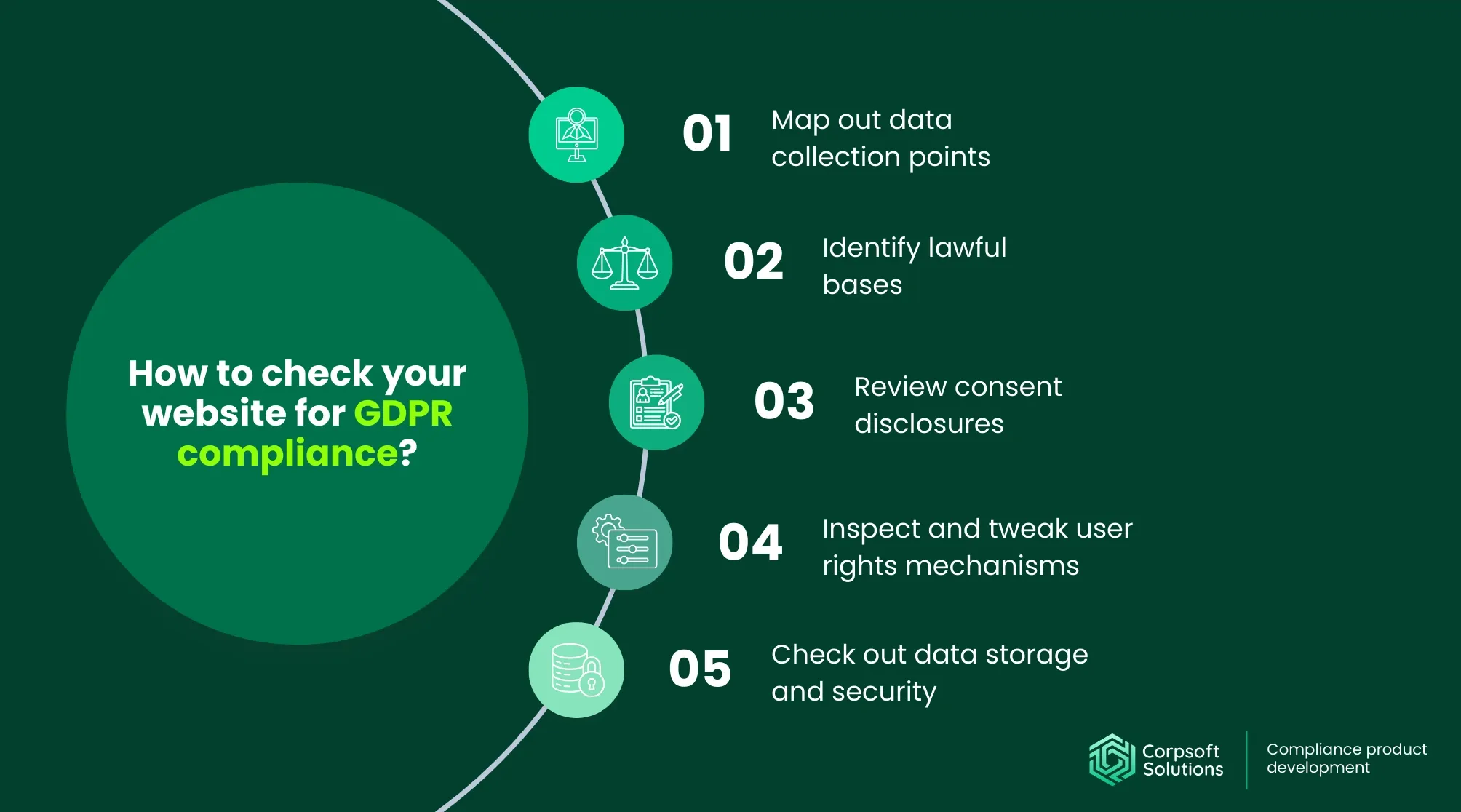
So, how do you check if your website meets GDPR compliance requirements?
The best way to go about it is like a compliance auditor would. Map the journey of a typical user of your website, moving from the outside in to the deep technical layers. Here’s a step-by-step guide to make it easier for you:
#1 Map out data collection points
The first step is to create a complete inventory of points where users’ personal data enters your website. This includes:
- Contact forms
- Account registration flows
- Newsletter subscriptions
- Cookies and trackers
- Server logs
- Third-party integrations
You can do this by using a website and development tools:
- Scanning your website for scripts. Use automated scanning tools or browser developer tools to detect all scripts, tags, and trackers running on your pages. This helps uncover hidden third-party technologies that collect personal data without clear visibility in your codebase.
- Reviewing backend logs. Analyze server, application, and access logs to identify what technical identifiers are being stored, such as IP addresses or session data. This step often reveals background processing activities that are not visible in the frontend.
- Consulting development and marketing teams. Speak with the teams responsible for implementing features, analytics, and campaigns to understand what tools are actively used and why. These discussions help surface undocumented integrations, temporary scripts, or legacy tools that still process personal data.
As a result, you will have a comprehensive data flow map that shows data sources, storage locations, and processing purposes for all users of your website.
#2 Identify lawful bases
A GDPR lawful basis (or lawful base) is the legal justification an organization must have before it can process personal data. Under the GDPR, processing is permitted only if it falls within one of the legally defined grounds in Article 6
The common six lawful bases are:
| Consent | The user gives clear permission | Marketing cookies, newsletter signup |
| Contract | Processing is necessary to fulfill a contract | Creating or managing a user account |
| Legal obligation | Required by law | Storing billing records for tax purposes |
| Vital interests | Protecting someone’s life | Emergency medical data processing |
| Public task | Performing an official public function | Government service portals |
| Legitimate interest | Business needs that don’t override user rights | Basic security logging |
In practice, most websites rely on three lawful bases:
- Consent — For analytics, marketing cookies, newsletters, and tracking.
- Contract — For account creation, transactions, and service delivery.
- Legitimate interest — For security, fraud prevention, and basic site functionality.
#3 Review consent disclosures
Consent mechanisms should be evaluated against several criteria. Each one reflects specific GDPR requirements around valid, informed, and freely given consent.
Key questions include:
- Is consent granular by purpose? Users should be able to approve or reject different types of processing separately, such as analytics, marketing, or personalization. Bundling all purposes into a single “accept” option renders consent invalid by removing meaningful choice.
- Can users easily reject? The option to refuse consent must be as visible and accessible as the option to accept it. If the reject option is hidden, requires extra clicks, or is phrased in a confusing way, regulators may treat the consent as coerced or manipulated.
- Are cookie categories clearly explained? Each cookie category should include a short, plain-language explanation of what it does and why it is used. Users must understand the consequences of accepting or rejecting each category before making a decision.
- Are consent choices recorded? The system must log when and how consent was given, including the user’s preferences, timestamp, and policy version. Without proper records, the organization cannot demonstrate that consent was valid.
Technical testing should confirm that no optional scripts run prior to consent. This includes verifying script behavior across different pages, devices, and user interactions to ensure consistent enforcement.
#4 Inspect and tweak user rights mechanisms
GDPR grants individuals specific rights over their personal data, and websites must provide practical, accessible ways to exercise them:
- Request data access. Users must be able to request a copy of the data an organization holds about them. This is typically done through a Data Subject Access Request (DSAR), and the process should be easy to find, simple to complete, and supported by a workflow that ensures responses are delivered within the required deadlines.
- Correct inaccuracies. Individuals have the right to update or correct incorrect personal data. Websites should either allow users to edit their information directly in account settings or provide a clear process for requesting corrections.
- Delete data. Under the right to erasure, users can request that their personal data be deleted when it is no longer necessary or when they withdraw consent. Organizations must have backend processes that can locate and remove data across all relevant systems.
- Withdraw consent. If processing is based on consent, users must be able to withdraw it as easily as they gave it. This typically requires a visible preference center or account-level privacy controls that immediately stop optional processing.
- Restrict processing. In certain situations, users can request that their data be stored but not actively processed. Websites should provide a clear request mechanism, and internal systems must be able to flag and enforce these restrictions.
These mechanisms should be clearly visible, easily accessible, and operationally supported by internal workflows.
#5 Check out data storage and security
To ensure long-term GDPR compliance for the website, you should back it up with a hardened security posture, supported by regular security assessments and tests. Pay attention to the following:
- Encryption standards. Review whether personal data is encrypted both in transit and at rest using current, industry-accepted protocols.
- Access control policies. Evaluate who can access personal data and under what conditions. Follow the principle of least privilege, with clear role-based permissions, regular reviews, and immediate revocation when roles change.
- Authentication practices. Check how users and employees authenticate into systems that handle personal data. Strong password policies, multi-factor authentication, and secure session management reduce the risk of unauthorized access.
- Backup procedures. Ensure that personal data is backed up regularly, stored securely, and recoverable in case of system failure or cyber incidents.
- Incident response readiness. Assess whether the organization has a clear, tested process for detecting, reporting, and managing data breaches. This includes defined roles, escalation paths, and the ability to meet GDPR’s breach notification deadlines.
In addition to these controls, security measures should be designed with scalability in mind. Scalable security architectures ensure that protection mechanisms, monitoring systems, and response processes remain effective even as the organization’s structure becomes more complex.
How to fix website GDPR compliance issues?

Implementing proper consent management
An effective consent framework requires:
- Consent management platform (CMP). A CMP centralizes the collection, storage, and enforcement of consent across the website. It ensures that user preferences are consistently applied and provides a single source of truth for consent records.
- Script blocking prior to consent. All non-essential trackers must be blocked by default until the user provides explicit permission. This requires proper integration between the CMP and website scripts to prevent accidental data processing.
- Clear categorization of cookies. Cookies should be grouped into understandable categories such as necessary, analytics, marketing, or preferences. Each category must have a concise explanation so users can make informed decisions.
- Secure consent logging. The system must store consent records in a tamper-resistant format. Logs should be accessible for audits and linked to specific user sessions or devices.
Consent records should include:
- Timestamp
- User choices
- Policy version
- Device information
These logs serve as critical evidence during audits, proving that processing activities were based on valid consent at the time they occurred.
Designing transparent user experiences
Compliance should be integrated into user experience design rather than treated as a legal afterthought. Transparency must be built into data collection processes.
Best practices include:
- Clear and simple language. Privacy messages should be written in plain, understandable terms instead of dense legal text. Users must be able to understand what happens to their data without having to interpret legal jargon.
- Layered privacy notices. Instead of overwhelming users with long policies, present short summaries at the point of data collection, with links to detailed explanations. This improves both usability and regulatory transparency.
- Equal visibility for accept and reject options. The interface must present acceptance and refusal choices in a balanced way. If one option is more prominent or easier to select, regulators may consider the consent invalid.
- Easily accessible preference centers. Users should be able to review and adjust their consent settings at any time. A visible privacy or cookie settings link ensures that consent remains under user control.
Transparent design not only improves compliance but also strengthens user trust. When privacy choices are clear and easy to manage, users are more likely to engage with the website confidently.
Securing data flows and storage
Organizations should implement a few essential layers of security, including:
- End-to-end encryption. Personal data should be encrypted during transmission and, where appropriate, at rest. This reduces the risk of data breach or unauthorized access.
- Secure API authentication. Integrations with third-party tools should use strong authentication methods, such as token-based access or certificate validation, to prevent unauthorized data transfers.
- Regular vulnerability assessments. Periodic scans and penetration tests help identify weaknesses in website infrastructure. Addressing vulnerabilities early prevents them from escalating into reportable incidents.
- Vendor security evaluations. Third-party providers that process personal data must meet adequate security standards. Organizations should regularly review vendor certifications, contracts, and security practices.
Security measures should align with the sensitivity and volume of processed data, ensuring that protection scales with operational complexity.
Automating compliance operations
Manual compliance processes are difficult to sustain, especially as websites evolve, new tools are introduced, and data flows become more complex. That’s why it’s important to automate routine operations.
Automation helps:
- Maintain compliance by continuously scanning systems to detect new data flows, scripts, or integrations, ensuring that data inventories stay accurate over time.
- Centralize consent tracking to ensure user preferences are applied consistently across all trackers and third-party tools.
- Identify unusual processing behavior, misconfigured scripts, or potential security issues before they escalate into compliance incidents. Many platforms also automatically keep documentation up to date, adjusting records, reports, and risk assessments as processing activities change.
Automation reduces human error, improves operational visibility, and ensures that compliance controls remain effective as websites scale. Increasingly, organizations are also adopting AI solutions for business that can analyze data flows, flag risks in real time, and recommend remediation steps, making compliance management faster and more adaptive.
Tools that help maintain website GDPR compliance
Technology plays a central role in maintaining compliance as websites grow more complex. Different tool categories address specific parts of the compliance lifecycle, from consent collection to security monitoring.
- Consent management platforms. These tools manage cookie banners, preference centers, and consent logs while technically blocking non-essential trackers until the user provides permission. They help ensure that consent is collected in compliance and that user choices are enforced consistently across all scripts and third-party tools.
- Data discovery & mapping tools. Data discovery solutions automatically scan websites and connected systems to identify where personal data is collected, stored, and shared. They help organizations maintain accurate data inventories, detect shadow integrations, and understand how information flows across their digital environment.
- Privacy automation solutions. These platforms streamline core compliance operations, including handling data subject requests, maintaining processing records, tracking risks, and updating policies. By automating routine tasks, they reduce manual workload and improve consistency across privacy workflows.
- Security monitoring & incident reporting systems. Security tools monitor systems for suspicious activity, detect potential breaches, and generate incident reports. They support faster response times and help organizations meet GDPR’s breach notification requirements by providing real-time alerts and documented response processes.
Check out our HIPAA & ISO 9001 compliance guide for incident reporting software in healthcare to see how we handle industry-specific and global compliance issues.
How to build a continuous compliance monitoring process?
Finally, once you achieve website GDPR compliance, make sure to maintain it long-term. Without ongoing oversight, even a previously compliant website can drift into violation as vendors update their scripts, tracking mechanisms change, and new data flows emerge.
A mature compliance program typically includes several core components:
- Governance structure. Organizations should establish clear accountability for privacy operations. This includes assigning a responsible owner for website compliance, defining internal policies that govern the collection and processing of personal data, and establishing escalation procedures for incidents or regulatory inquiries.
- Regular audits. Continuous oversight requires periodic checks of how the website actually behaves. This can be achieved through scheduled website scans to detect trackers, vendor compliance reviews, and regular testing of consent mechanisms.
- Documentation management. Up-to-date website documentation is proof of accountability. Organizations should maintain accurate records of data processing activities, risk assessments, incident logs, and policy updates.
- Training and awareness. Compliance depends on the people who manage and build the website. Marketing teams need to understand how trackers and analytics tools affect privacy obligations. Developers should know how to implement scripts in a compliant way, and customer support teams must be prepared to handle user rights requests.
These components create a continuous monitoring cycle that keeps compliance aligned with real operational behavior rather than static policies.
Conclusion
Ultimately, website GDPR compliance should be understood as an operational discipline rather than a legal checkbox. Businesses that succeed treat compliance as an ongoing process involving data visibility, technical controls, clear documentation, and continuous monitoring.
By choosing Corpsoft Solutions as your technology partner, you will gain a streamlined compliance management process that helps ensure your business remains compliant with European regulations and builds user trust.
We can help you achieve and maintain website compliance by:
- pinpointing the website areas most prone to compliance violations
- creating a comprehensive data flow map and assigning lawful bases to the data collection process
- embedding compliance management tools into each website layer
- improving your security stance and protecting your website from data breaches
- automating routine data collection workflows, alerts, and notifications, to make sure that no data bits remain unsupervised.
Reach out to us, explain your compliance challenges, and the Corpsoft Solutions expert team will develop a custom compliance roadmap just for you!
Share this post: