


TL;DR:
API key exposure is one of the most common and most invisible cybersecurity risks in modern software products. Key findings from this article:
- A hardcoded API key in an AI-generated landing page gave attackers access to an email service — resulting in 4,000 phishing messages sent from a client’s domain in hours
- Automated bots scan public repositories continuously; according to GitGuardian’s State of Secrets Sprawl 2025, nearly 24 million new hardcoded secrets were exposed on public GitHub in 2024 alone
- Not all API keys carry equal risk — public client identifiers are designed for frontend use; secret credentials are not, without exception
- A one-time audit isn’t a security posture. Secrets management needs to be embedded in your architecture from day one
- If your product includes AI-generated code, unreviewed third-party integrations, or is approaching its first enterprise deal or compliance audit — this article is directly relevant to your stack
A few weeks ago, a client started getting calls from their users. Phishing emails — sent from the company’s official domain. The first assumption was a breach. The real cause was simpler, and considerably worse.
Based on what the case shows: a three-year-old API key, hardcoded into a landing page the client had built independently using an AI tool — unrelated to the product Corpsoft was developing for them. No one had rotated it. By all indications, no one knew it was there. That key, in all likelihood, gave an attacker access to the email service. Within hours, roughly 4,000 phishing messages were sent from the client’s domain.
No data was stolen. But the actual cost of the incident turned out to be far higher than anyone anticipated. A week of incident response. An engineering team pulled off their roadmap. A domain reputation that will take months to recover. Corpsoft stepped in to help contain the damage and built a plan to prevent it from happening again.
This wasn’t a reckless mistake by a careless developer. It was the entirely predictable result of a gap that most teams don’t think to look for — until something like this forces them to.
If your product relies on third-party integrations, was partly built with AI coding tools, or has grown faster than your security processes have — this article is directly relevant to your stack.
API key exposure is one of the most common cybersecurity risks in modern software products. It’s also one of the most invisible — not because it’s technically complex, but because it doesn’t announce itself. The key sits in the codebase. The integration keeps working. Nobody flags it. And then one day, someone else finds it first.
This article covers how that happens, why it’s a cybersecurity risk that compounds quietly over time, and what a proper cybersecurity risk assessment of your API key infrastructure actually looks like — before the incident that makes it urgent.
How one AI-generated landing page gave attackers access to a client’s email service
When something like this occurs, the instinct is to find the person who made the error. Who hardcoded the key? Why didn’t anyone rotate it? But that framing misses the point entirely — and it won’t prevent the next incident.
The anatomy of what happened looks like this:
A client builds a landing page using an AI coding tool → the tool generates functional code with an API key embedded in the frontend → the page ships, the integration works, no one flags the key → months pass, then years → no rotation, no alerts, no assigned owner → an attacker scans the public codebase, finds the key, validates it in seconds → gains access to the email service → sends roughly 4,000 phishing messages from the client’s own domain before anyone notices.
Every step in that chain is ordinary. That’s the problem.
AI coding tools are optimized for output, not for security posture. When a developer asks an AI assistant to scaffold a landing page or wire up a third-party integration, the tool produces code that works. It connects to the API. It passes the test. What it doesn’t do is flag that an API key is stored in a client-side JavaScript file that any user with browser DevTools can read. Functional code and secure code are not the same thing — and a cybersecurity risk assessment that treats them as equivalent will miss this class of issue entirely. As AI-assisted development becomes the default, this gap widens, not closes.
For a broader look at regulatory exposure from AI-assisted development, see AI Compliance for Business Leaders.
Unrotated keys aren’t a sign of negligence. They’re a sign of absent process. The pattern is consistent: a key gets created for a prototype or a quick integration. The prototype becomes production. The key stays. No one sets a rotation schedule because no one thought to — there was no system prompting them to. There’s no owner on record, no expiry date, no alert when the key goes six months without review. This is what cybersecurity risk looks like when it’s invisible: not dramatic, not malicious on the inside — just a credential sitting in a codebase, waiting.
Serhii Bodnia, DevOps Engineer & Squad Lead at Corpsoft Solutions, sees this pattern consistently during client onboarding processes:
“When we start working with a new client, one of the first things we look at is how credentials are being shared and stored. It’s still common to find API keys sent in plaintext through general team chats — a channel where the entire company has access — for a key meant for one engineer. We also regularly find servers with open SSH access and exposed connection keys that haven’t been restricted. And hardcoded keys in project code have become noticeably more frequent with the rise of AI-generated code — the tool produces something that works, it goes into the repo, and no one looks twice at the configuration.”
The thread that connects all of these patterns is the same: security wasn’t built into the process. It was left to individual judgment — and individual judgment, under deadline pressure with a functional result in front of them, defaults to shipping.
A proper cybersecurity risk assessment doesn’t assume the team was careless. It assumes the system didn’t give them a reason to stop.
How attackers find exposed API keys in minutes
This isn’t a sophisticated, targeted attack. It doesn’t require a skilled adversary or weeks of reconnaissance. It’s automated, continuous, and among the most underestimated cybersecurity threats facing modern software teams — happening at scale, right now, across millions of public repositories.
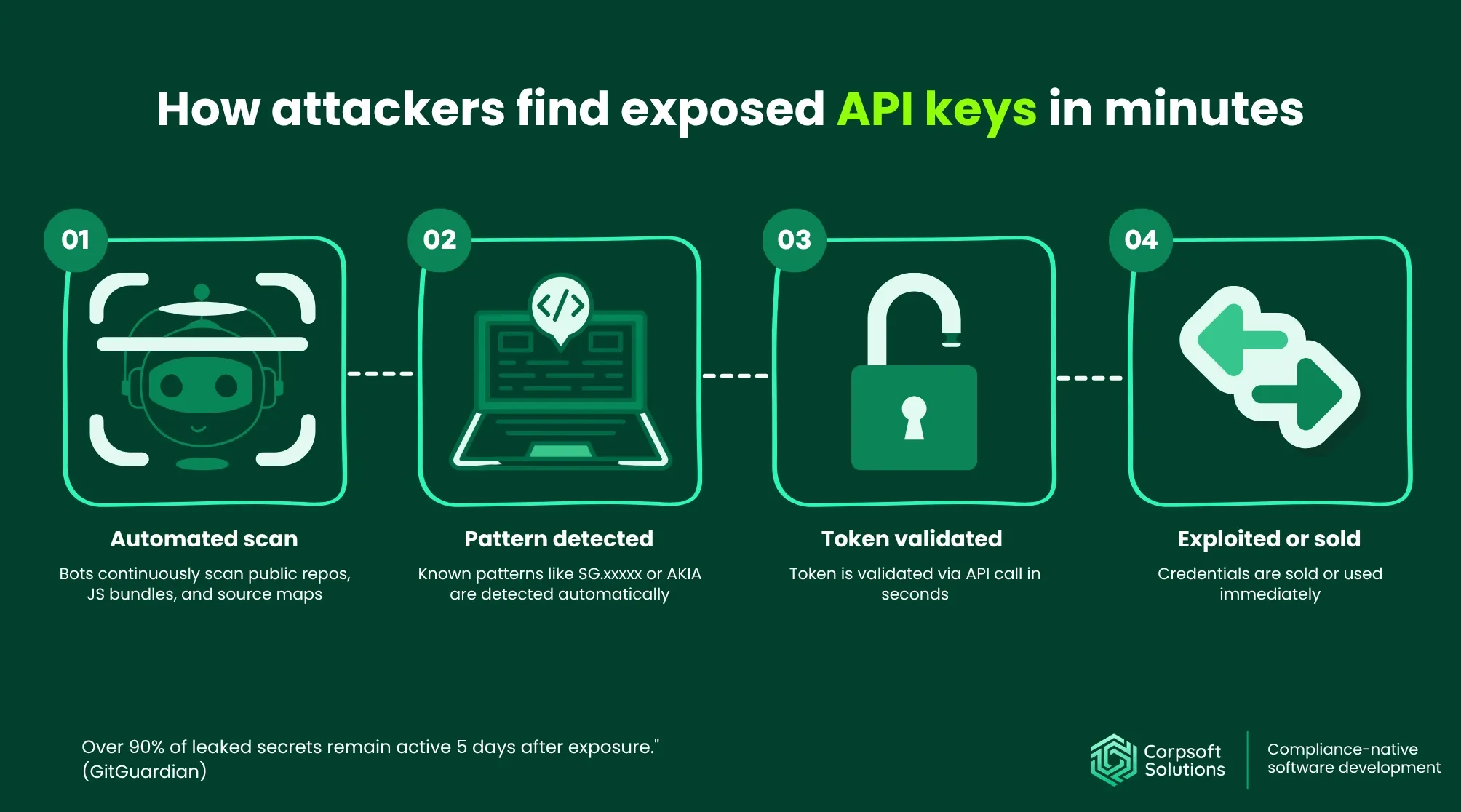
Specialized bots crawl GitHub repositories, compiled JavaScript bundles, source maps, exposed Docker images, and browser DevTools responses around the clock. They’re not looking for anything in particular — they’re pattern-matching against known credential formats: SG.xxxxx for email services, sk- for OpenAI, AKIA for AWS. When a match appears, the next step is immediate and automated.
According to GitGuardian’s State of Secrets Sprawl 2025, nearly 24 million new hardcoded secrets were exposed on public GitHub in 2024 alone — a 25% year-over-year increase. More critically, 70% of secrets leaked in 2022 remain active today, meaning exposure compounds long after the initial leak. The attack chain looks like this:
- Detection. A bot identifies a known credential pattern in a public file — a JS bundle, a GitHub commit, a source map rendered in the browser.
- Validation. The token is automatically tested against the vendor’s API. This takes seconds. If it returns a valid response, the key is live.
- Categorization. The system logs the vendor, the scope of access, and the permissions the key carries. A key that can send email is categorized differently from one that can read a database — both are valuable, for different reasons.
- Exploitation or sale. Valid credentials either go to market on dark web forums or get used immediately, depending on what they unlock. There’s no delay between discovery and damage.
What makes this particularly difficult to contain is what happens after detection. Even after a key is found and the file removed, the credential stays valid until explicitly revoked — and discovery without revocation changes nothing.
Deleting the file from your repository doesn’t close the exposure either. Git preserves history. A key that was committed three years ago and deleted last week is still visible to anyone who browses that repository’s commit log or checks out an earlier revision. This is one of the most common data leak vectors that automated scanners catch — and most teams don’t know to look there.
This is what makes API key exposure a persistent cybersecurity risk rather than a recoverable incident: the window between exposure and damage is measured in minutes, while the window between damage and detection is measured in days.
API keys in frontend code are security debt — not a one-time mistake
Most teams think of a leaked API key as an incident — something that happened, got resolved, and is now behind them. That framing is the problem.
Cybersecurity risk doesn’t work like a bug ticket. You don’t close it and move on. An API key sitting in frontend code is security debt: it accumulates silently, doesn’t show up in sprint reviews, and doesn’t announce itself until it becomes a crisis.
Technical debt slows your team down. Security debt waits.
How keys end up in the wrong place — three patterns that repeat across almost every codebase we audit:
1. The prototype that became production.
A developer needs to quickly wire up a third-party integration. They add the API key directly to a .js file to test the connection. It works. The deadline is tomorrow. The key stays where it is, the code ships, and the “temporary” configuration becomes permanent infrastructure. No one revisits it because nothing breaks — and in software, things that don’t break don’t get attention.
2. The AI-generated code that no one reviewed for security.
An AI coding tool scaffolds a component or a full landing page. The output is clean and functional, and it connects to the API correctly. It also has a secret key in the client-side configuration, because the tool optimized for working code, not for secure code. The developer reviews the logic. Nobody reviews the credentials. The code goes into the repository.
3. The commit that “got cleaned up.”
A key is accidentally committed to a public repository. Someone catches it, deletes the file, and pushes the fix. The team exhales. But the key is still in the git history — visible to anyone who looks at earlier commits or checks out a previous revision. The cleanup addressed the symptom, not the exposure.
Why this lives in codebases for years.
The answer is simple: the key works. The integration is stable. There’s no alert, no failed build, no error log pointing to a credential sitting in a JavaScript bundle. From the outside, everything looks fine — because everything is fine, functionally. The cybersecurity risk is invisible precisely because it doesn’t interfere with anything. Until it does.
This is why a point-in-time fix isn’t enough. Rotating one key after an incident doesn’t tell you how many others are sitting in codebases you’ve forgotten about, in integrations nobody owns, in repositories that went public three years ago. That’s what a proper cybersecurity risk assessment surfaces — not just the key that caused the problem, but the architecture that allowed it to exist undetected.
Public vs. secret API keys: what can safely live in frontend code
Not every API key carries the same risk. One of the most common points of confusion — even among experienced developers — is the assumption that “API key in the frontend” is categorically wrong. It isn’t. What matters is what the key does.
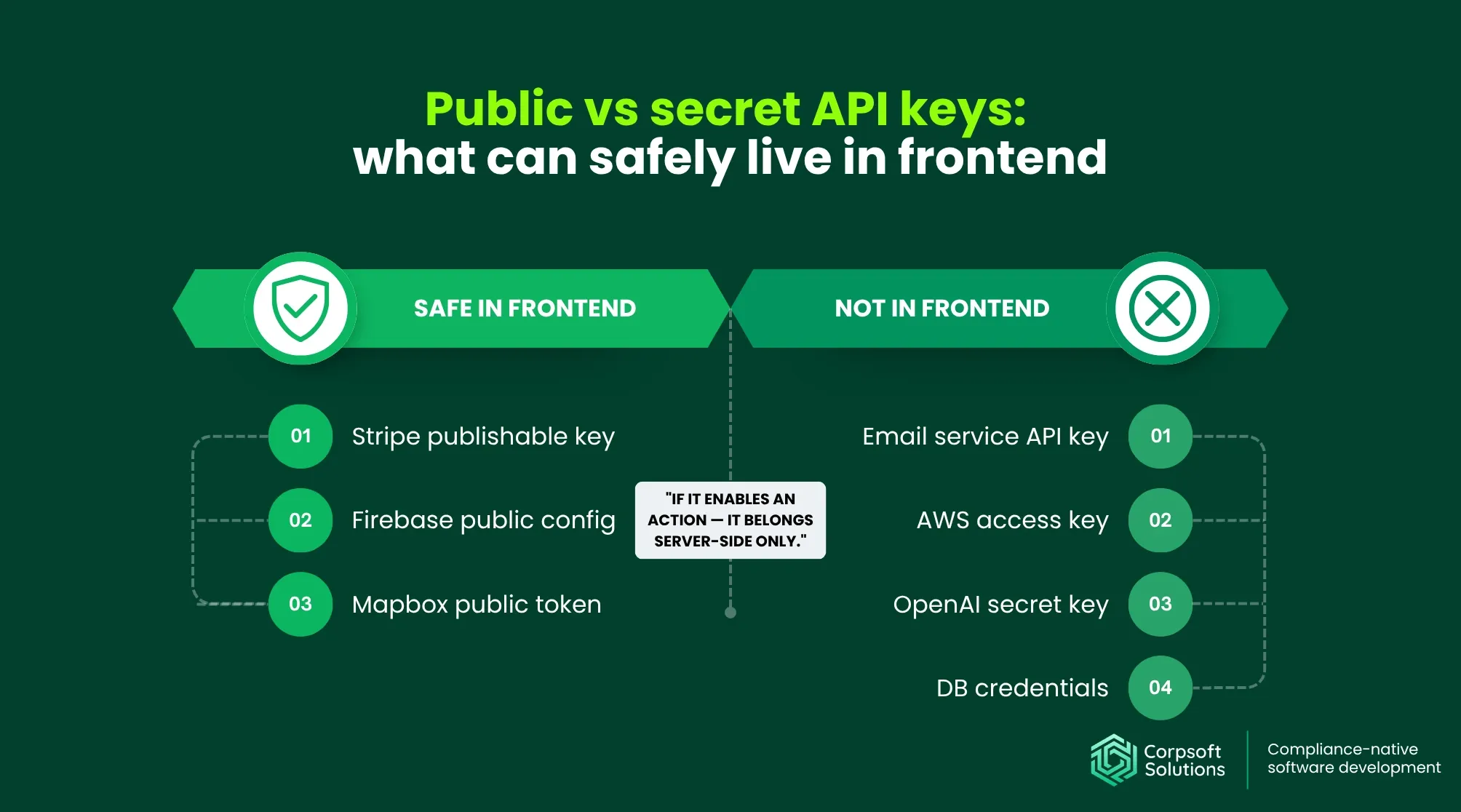
There’s a meaningful architectural distinction between public client identifiers, which are designed to be exposed, and secret credentials, which are not. Conflating the two leads to either unnecessary panic about safe configurations or, more dangerously, false confidence about unsafe ones.
|
Key type |
Safe in frontend? |
Why |
| Stripe publishable key | Yes | Designed for client-side use; cannot authorize charges without server-side confirmation |
| Firebase public config | Generally yes | Public identifier; access controlled by Firebase security rules, not the key itself |
| Mapbox public token | Yes, with restrictions | Safe when scoped to a specific domain; unrestricted tokens carry higher risk |
| Email service API key | No | Grants ability to send email — exactly what enabled the incident described above |
| AWS access key | No | Provides access to infrastructure; scope depends on IAM policy, risk is high regardless |
| OpenAI secret key | No | Billable and privileged; exposure leads to immediate financial and data risk |
| Database credentials | Never | Direct read/write access to data; no architectural justification for frontend placement |
The principle that cuts through every edge case: if the key enables an action — sending, writing, charging, reading protected data — it belongs server-side, without exception. The name of the key doesn’t matter. The vendor’s marketing copy doesn’t matter. What matters is what an attacker can do with it if they find it in your JavaScript bundle.
A practical test worth running before any integration ships: ask your team, “If this key leaks tomorrow, what can someone do with it?” If the answer involves any consequential action — sending 4,000 phishing emails, spinning up AWS instances, draining an API quota, or accessing user records — the key does not belong in frontend code.
This distinction also matters for cybersecurity risk assessment conversations with enterprise buyers and auditors. Security questionnaires increasingly ask not just whether credentials are protected, but whether teams understand which credentials require protection and why. Demonstrating that architectural judgment is part of how you build — not just something you retrofitted after an incident — is a different category of answer.
API key audit checklist: five cybersecurity best practices
Knowing the risk exists is different from knowing where it lives in your specific codebase. The checks below aren’t theoretical — they reflect what a practical cybersecurity risk assessment of API key infrastructure actually covers. Work through them in order; the first two tend to surface the most immediate exposure.
1. Audit every API key — including the ones from old projects
The keys you know about are rarely the problem. The ones nobody remembers are.
Start with automated scanning across your repositories. Tools like truffleHog, git-secrets, and GitHub’s native secret scanning detect known credential patterns across commit history — not just the current state of the codebase. Run them against active repositories and any archived projects that ever touched production integrations.
When you find something, the response depends on the situation. Rotation — replacing a key with a new one while keeping the integration active — is appropriate for credentials you recognize and still use. Revocation — permanently invalidating the key — is the right call for anything you don’t recognize, can’t attribute to a current integration, or haven’t touched in over a year. If you’re unsure which category a key falls into, revoke it. The cost of re-issuing a legitimate credential is lower than the cost of leaving an unknown one active.
On rotation cadence: the OWASP Secrets Management Cheat Sheet recommends centralized secrets management, regular auditing, and immediate revocation of credentials with unknown provenance. Twelve months is a reasonable starting point for rotation schedules — treat it as a floor, not a ceiling, and adjust based on the sensitivity of what the key accesses.
2. API keys don’t belong in frontend code
This sounds obvious after reading the sections above. It’s still one of the most common findings during a security audit.
The critical distinction for developers: a .env file on a server and a .env file in a frontend build are not the same thing. In a frontend build, environment variables get compiled into the JavaScript bundle at build time — which means they’re readable by anyone who opens DevTools in their browser. The variable name starts with REACT_APP_ or VITE_, rather than being hardcoded directly, but the value is just as exposed.
A quick check: search your frontend codebase for process.env references and trace where those values go. If any of them map to credentials that enable consequential actions — sending, writing, charging — they need to move server-side before the next deployment.
3. Give each integration the minimum access it needs
The email service that caused the incident described at the start of this article likely didn’t need full account access. A key scoped to transactional sending only — with no access to contact lists, account settings, or billing — would have significantly limited what an attacker could do with it.
The OWASP principle of least privilege applies directly here: every integration should have access only to the specific actions it needs to perform its function, nothing more. In practice, this means reviewing the permission scope of each key when it’s created — and again during quarterly reviews.
In regulated environments, this connects directly to compliance requirements. Under GDPR (Articles 25 and 32), data minimization and access control are architectural obligations, not optional best practices. CCPA and CPRA similarly require organizations to limit data collection and processing to what’s necessary for the stated purpose — which extends to how third-party integrations are scoped and what data they can reach. Under HIPAA, the minimum necessary standard applies to any system that touches PHI, including the integrations and the credentials that connect them.
4. Set alerts for anomalous activity on your email platform
Most email platforms support activity monitoring and threshold-based alerts. The specific configuration varies by provider — check your platform’s documentation for where to set these up.
The scenario worth protecting against is straightforward: if your system typically sends around 200 emails per day and suddenly dispatches 4,000 within a few hours, that’s a signal your team should receive before your users do. A volume spike of that magnitude is detectable in advance of any user complaint — but only if someone has configured the alert. In the incident described earlier, the client’s users called first. That sequence is avoidable.
5. Review third-party integrations on a quarterly cadence
Active integrations accumulate. Vendors get replaced, projects get deprecated, and team members who owned specific connections leave — and the keys they set up often remain active long after the relationship ends.
A quarterly review doesn’t need to be exhaustive. Four questions cover the essentials: Which keys are currently active in production? Who is the named owner of each one? When was it last rotated? Is the integration still in use?
That last question matters more than it might seem. A vendor you stopped using eighteen months ago may still have a valid key sitting in your configuration — one that gives them, or anyone who obtains their credentials, ongoing access to your environment.
In regulated environments, this review also means verifying the appropriate data processing agreements are in place. For GDPR, that’s a Data Processing Agreement (DPA) with each sub-processor that handles personal data. For HIPAA, it’s a Business Associate Agreement (BAA) with any vendor that touches PHI. For CCPA/CPRA compliance, it means confirming that service providers operate under contracts that restrict how they can use the data your integration shares with them. If a vendor won’t sign the relevant agreement — that’s not an administrative inconvenience. The legal and operational risk stays with you.
What an API key incident actually costs
The technical cleanup after a credential leak is the part teams plan for — or at least can estimate. It’s also the smallest part of the total cost.
Direct costs are visible and immediate. Incident response hours. Engineering time pulled from the roadmap to trace the exposure, revoke credentials, coordinate with vendors, and verify that the attack vector is actually closed. Depending on the complexity of your integration layer, that process can take days — during which your team is not building.
Indirect costs take longer to appear and longer to resolve. A compromised domain reputation doesn’t recover on its own. Email deliverability drops when major providers start flagging your domain based on spam reports — reports generated by phishing messages your infrastructure sent, from your address, to your users. Rebuilding sender reputation can take weeks to months, and during that window, every legitimate email your product sends is working against a penalty you didn’t intentionally create.
User trust operates on a similar timeline. Users who received a phishing email from your official address have a reasonable basis to be concerned about how their data is handled. Some will leave. Some will ask questions your support team isn’t positioned to answer quickly. The conversion and retention impact won’t appear in an incident report, but it will appear in your metrics.
Strategic costs are where credential leaks become existential for growth-stage companies. Enterprise cybersecurity procurement processes include security audit requirements specifically because buyers have been burned before. If an exposed API key surfaces during a security review — or if an incident becomes public before a deal closes — the question stops being “how do we remediate this” and starts being “do we still have a deal?”
SOC 2 and HIPAA audits ask directly about secrets management: where credentials are stored, whether rotation is automated, whether access is logged, whether scope is restricted. A company that can answer those questions with architecture rather than policy documents is in a different position than one that’s explaining a recent incident and a remediation plan.
For a deeper look at what enterprise procurement actually checks during security reviews, see: AI Governance and Compliance: The Hidden Cost of Waiting Until Your First Enterprise Deal.
According to the IBM Cost of a Data Breach Report 2025, the average cost of a data breach reached $4.88 million — a 10% increase from the prior year and the largest annual jump since the pandemic. Stolen or compromised credentials were the most frequent initial attack vector, accounting for 16% of breaches, and the most time-consuming to resolve, taking an average of 292 days to identify and contain. Even incidents that don’t rise to the level of a formal data breach carry costs that most teams significantly underestimate before they experience one.
The most expensive part of a leaked API key is rarely the incident itself. It’s the business consequences that follow it.
If the incident has already happened — or you suspect it might have: Corpsoft Solutions’ engineers have worked through credential exposure scenarios with clients at different stages of damage: from early detection to full incident response. If you’re dealing with an active exposure, a compromised integration, or simply don’t know what you’re looking at yet — talk to our team. We’ll help you understand the scope before it gets larger.
How to build API key security into your architecture — and stop revisiting It
The five checks in the previous section are the right starting point. But for products operating in regulated industries — or heading toward their first enterprise deal — a one-time audit isn’t a security posture. It’s a moment in time.

The difference between “we reviewed our API keys last quarter ” and “secrets management is embedded in how we build” lies in the distinction between a recurring task and an architectural decision. That second state is what Compliance-Native Architecture looks like in practice: security built into the system from the first line of code, not added in response to the first incident.
For a deeper look at how AI governance fits into this architectural approach, see AI Governance.
What this looks like concretely:
A dedicated secrets management layer — HashiCorp Vault, AWS Secrets Manager, or equivalent — that sits outside your application code entirely. Credentials are called at runtime and never stored in the codebase or in environment variables that compile into a frontend bundle. Rotation is automated and doesn’t require a developer to remember. Every access event is logged. The CI/CD pipeline checks for exposed secrets before any code reaches production.
This isn’t over-engineering for a growth-stage company. It’s the infrastructure that enterprise buyers expect to see documented, that SOC 2 auditors look for during fieldwork, and that HIPAA assessors ask about when evaluating whether your access controls meet the minimum necessary standard.
Why enterprise deals surface this gap.
Security questionnaires from enterprise procurement teams ask specific questions: Where are secrets stored? Is rotation automated? Are access logs retained? What is the scope of each integration’s permissions? A team that answers these questions with architecture — “here’s our Vault configuration, here’s our rotation policy, here’s our access log” — is in a categorically different position from one that answers with intent — “we plan to address this before the audit.”
The client in the incident described at the start of this article didn’t have a secrets management layer. The key that caused the damage lived in frontend code, unrotated, unmonitored, with no owner. That’s not an unusual configuration for a team that built fast and planned to harden later. It’s also the configuration that fails a cybersecurity audit and, more immediately, fails under an automated scan running somewhere right now.
Serhii Bodnia, DevOps Engineer & Squad Lead at Corpsoft Solutions, describes how a Risk Assessment of API key infrastructure actually unfolds:
“The first thing I do is collect every key connected to the project — where it’s stored, what it calls. Without that inventory, there’s no point moving forward; there are almost always credentials nobody remembers are there. The second step is classifying them by scope — a key with superadmin rights on an integration is a different problem from a GitHub token scoped to read-only. I look at what data each key can reach: PHI, infrastructure, user records. And I check whether any of it is sitting exposed. The last step is tracing how each key is stored, how it’s maintained, and who actually has access to it. That sequence tells you the full picture.”
Most teams don’t have that sequence. They have keys that work, integrations that run, and no documented answer to who owns what and why. A cybersecurity risk assessment that maps your secrets inventory, classifies permissions, and traces access paths gives you that answer — and gives you the documentation to support it when an enterprise buyer or auditor asks.
The goal isn’t to pass one audit. It’s to build in a way that doesn’t require a rebuild when the stakes get higher.
Quick self-assessment: are you already at risk?
Before moving on to the next sprint, take five minutes to review this checklist. It won’t replace a full cybersecurity risk assessment — but it will tell you whether you need one urgently.

- We know every active API key in production and who owns it.
- No secrets are compiled into frontend bundles or client-side code.
- Keys are rotated automatically or on a documented schedule.
- Third-party vendors have minimum necessary permissions — nothing broader.
- Alerts are configured for anomalous activity on email and critical integrations.
How to read your score:
0–2 checked: High risk. The exposure likely already exists — you just haven’t found it yet. An incident is a matter of timing, not probability.
3–4 checked: Moderate risk. There are gaps that won’t cause problems today but will surface during your first enterprise security review or compliance audit.
5 checked: Solid baseline. Make sure it’s documented — “we do this” and “we can prove we do this” are different answers when an auditor asks.
You likely need this most urgently if your product includes AI-generated code that hasn’t been through a security review. If parts of your codebase were scaffolded by an AI assistant, there’s a reasonable chance credentials ended up somewhere they shouldn’t be — exactly the pattern that caused the incident described at the start of this article.
You’re also in the higher-risk category if you use third-party integrations you haven’t reviewed in over a year, if you’re preparing for your first enterprise deal or heading into a SOC 2, HIPAA, or ISO 27001 audit, or if the honest answer to “when did you last audit your API keys” is simply: you haven’t.
What CTOs should do this week
Reading about a risk and knowing what to do about it on Monday morning are different things. If this article raised concerns about your current setup, these three actions will tell you where you actually stand — without waiting for a full audit.
- Run a secrets scan across all public repositories — including archived ones.
Tools like truffleHog and GitHub’s native secret scanning scan commit history, not just current code. A key that was added three years ago and “deleted” last month is still in the history. This scan takes hours, not weeks — and it will tell you whether you have an active exposure right now. - Open your frontend bundles and search for credential patterns.
Pull your compiled JavaScript and search for known patterns: sk-, AKIA, or any string that looks like it shouldn’t be readable in a browser. If you find one, treat it as a live exposure until proven otherwise. This is a fifteen-minute check that most teams have never done. - Review permissions on your email, payment, and cloud API keys.
For each active key, ask one question: does this integration have more access than it needs to do its job? As agentic AI tools become part of your stack, this question becomes even more critical — each agent typically requires its own set of API credentials.
Learn more about agentic AI in business.
None of these replace a structured cybersecurity risk assessment of your full integration layer. But they will tell you within a week whether you have an urgent problem — or a manageable one.
If you’re evaluating external partners for a risk assessment, see our breakdown of cybersecurity consulting firms.
Ready to Find Out What’s Actually in Your Codebase?
The incident that opened this article began with a three-year-old API key that nobody knew existed. The team wasn’t careless. The process just didn’t exist.
A 7-day cybersecurity risk assessment with Corpsoft Solutions covers exactly this: we connect to your environment with read-only access, map your secrets inventory, classify permissions, identify exposed or unrotated credentials, and return a prioritized report with specific remediation steps. You’ll know what’s there, what it can access, and what to fix first.
Share this post: